what I learned
overview of doing custom instructions in solana.
i learned that when you want to do a custom instruction.(i.e to write program natively in solana) you need serializer/desirelize your custom data.
in solana we use
@serum/borshto do custom data serilizing and deserializing.Step when you want to put a custom data:
First you generate a
Schemain borsh. i.e what you want to send, say u need aSchema (name, id)then you create a
Buffer, and you allocate generouslythen you encode your data and put it inside the buffer.
Then you slice, or extract the data. I.e first you allocated generously now you’re optimizing your buffer by only using the data and removing the empty allocation.
then u create your
Transactioninstancethen your
TransactionInstruction, you put the ProgramID, the custom data data you want to send, and other details.then you send it.
this might be a bit not clear, because I am tired and I tried my best.
instruction data
instruction data should be
8 bitonly else it’s will be ignored.and One transaction can have many, instrutions and each instruction can have its own 8 bit data.
okay lets break down
8 bits: 8 is just the size andbitsis a machine code 0s and 1sthis is one of the reasons solana is blazing fast. instead of asking the network to convert ur data, you give it convetred one so it just process it.
serialization and borsh
serialization: is process of converting ur code data, into machine reabable code(0s and 1s) (array of bytes). (1byte is just 8 bits. )
we using borsh cuz it’s cool.
here is how we gonna serialize our data.
- create a schema/map of how the data gonna look (also, whe u do this u also giving the size(number of bits) your individual data element gonna take, this alows solana to exactly know where your data ends and begins. Which also brings me to another point - the
orderof your data elements matter as well. Because how the program reading your data is, it is saying the first8 bitsisid, and the next256 bitsisdescription… ) - allocate buffer generously
- you encode your data into the buffer
- you chop off the extra space at the end of the buffer.
- create a schema/map of how the data gonna look (also, whe u do this u also giving the size(number of bits) your individual data element gonna take, this alows solana to exactly know where your data ends and begins. Which also brings me to another point - the
PDA : you must now about
- pdas are Program drived Adresses. Not, accounts. They are special type of accounts.
- they’re not accounts because they do not have
publicKeyandprivateKey. i.e they are not on EDSA curve. they’re bumped using abump. - they are owned by the program which created them.
deserializaton and borsh
- So, when reading custom data, all good stuff is PDAs. because it is where our program data is stored.
PDA - again
special type of accounts used for stroing data.
EXCEPT THEY ARE NOT ACCOUNTS. because, they don have private keys.
they are controlled by the program which created them.
a nice demonestration of about PDA, your wallet and the program created them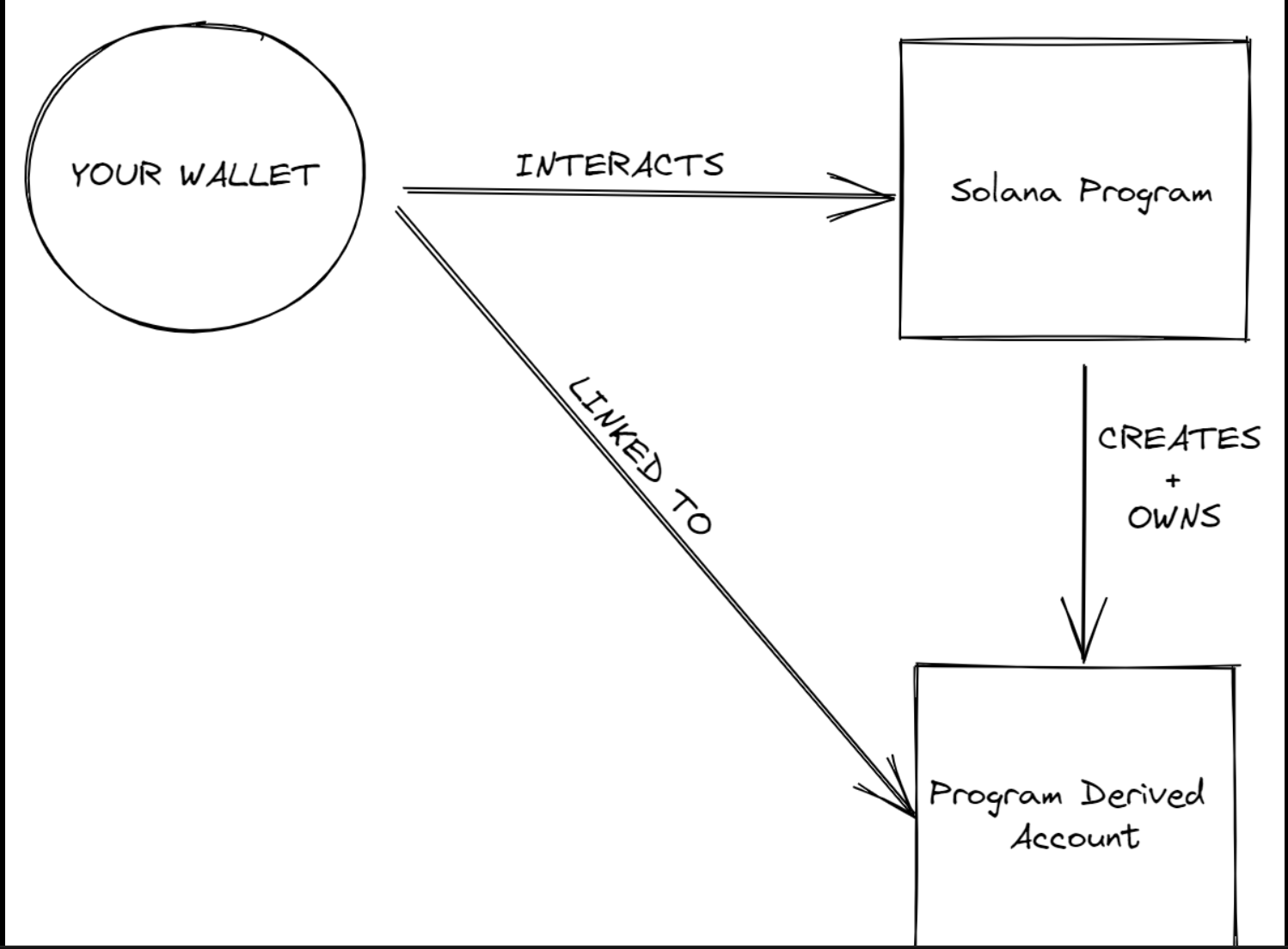
Accounts in solana are made using ED2559 signature system. (the thing that gets you public and private keys)
since PDA dont have private keys, they are not on ED2559 curve. nice demo below
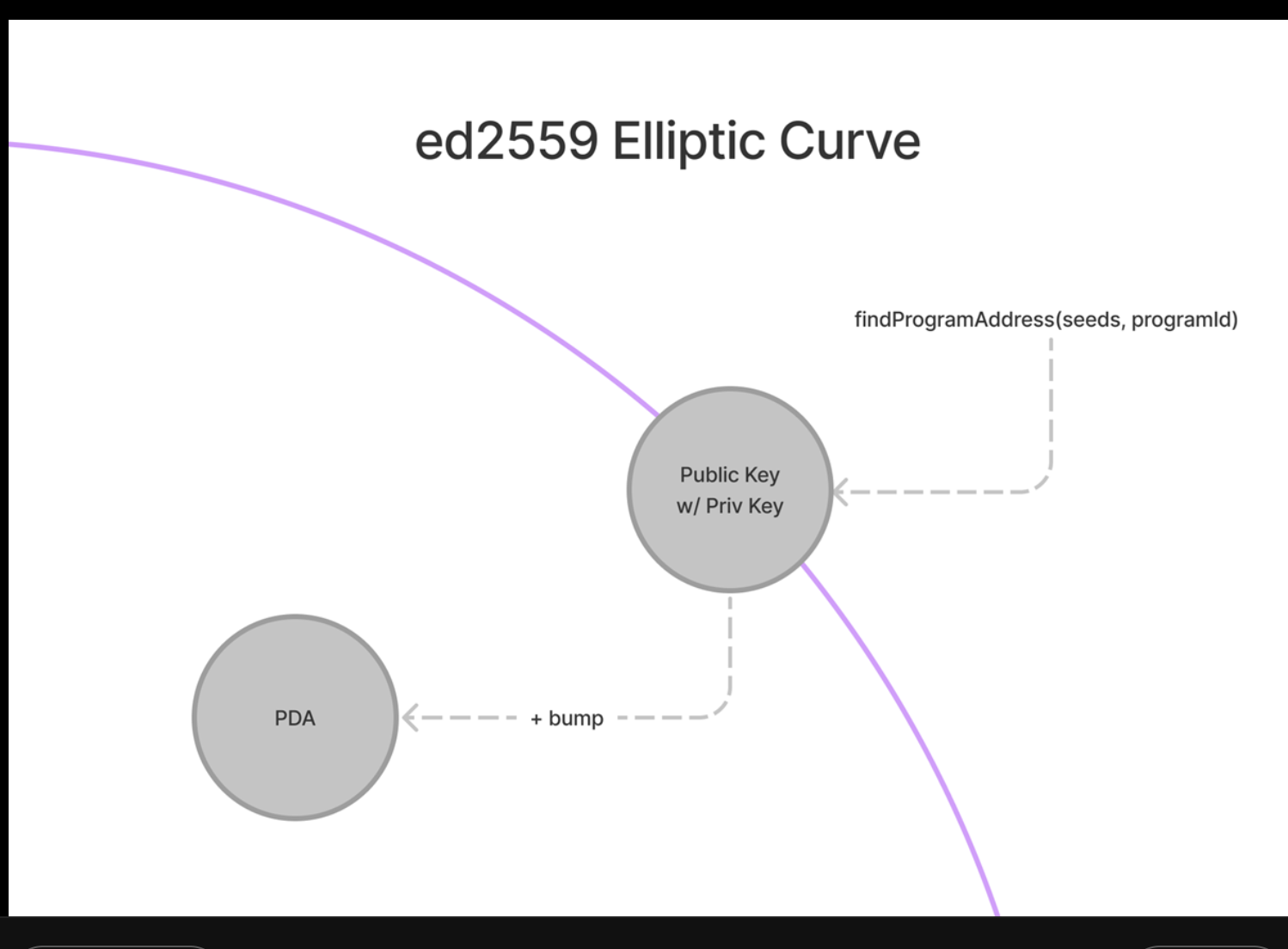
Sometimes,findProgramAddress gives us a key that is on the curve (meaning it has a private key too) so we add an optional “bump” parameter to take it off the curve.PDAs are a deterministic way for on-chain and off-chain programs to locate data.
it is something like as KV. the
bump,programIdandseedsaltogether make up to build akeythat identifies a data stored on network.because of PDAs we have got like a global database.
You can read data stored using something like this:
1 | const [pda, bump] = PublicKey.findProgramAddress( |
So, in the above example we’re trying read a data, that has associated with user(because we’re using publicKey as seed) and some other identifier(maybe if it is a notes app, could be note’s id or title but whatever unique)
Also, if we want to make our data key to be public, i.e something other people can call to fetch … it will be just chaning the seed to something that is CONSTANT.
10 megabyte limit of data storage on Solana per account.
and remember
youor thecallermustpayto store stuff on solana network.